Outlook 2016 search workflows for Alfred
 I love the app launcher Alfred. I use it all the time to launch app, but it’s also a very powerful productivity tool that supports workflows to extend it capabilities for searching, offer new actions on the results, etc.
I’ll strongly encourage you to at least take a look.
A while ago, I created a custom workflow to search in your Outlook 2011 identity directly from Alfred. The workflow was posted in the Alfred forums: https://www.alfredforum.com/topic/477-outlook-for-mac-workflow/
Since then, Outlook 2016 was released, then updated, and updated again and as I. Recently re-updated the workflow for the newer version, I realized I hadn’t posted anything about it here…
You can find the new workflow right here:
http://www.cortig.net/files/Outlook2016Searches.alfredworkflow.zip
All you have todo to install it is to double-click the workflow file: Alfred will launch and will import the workflow.
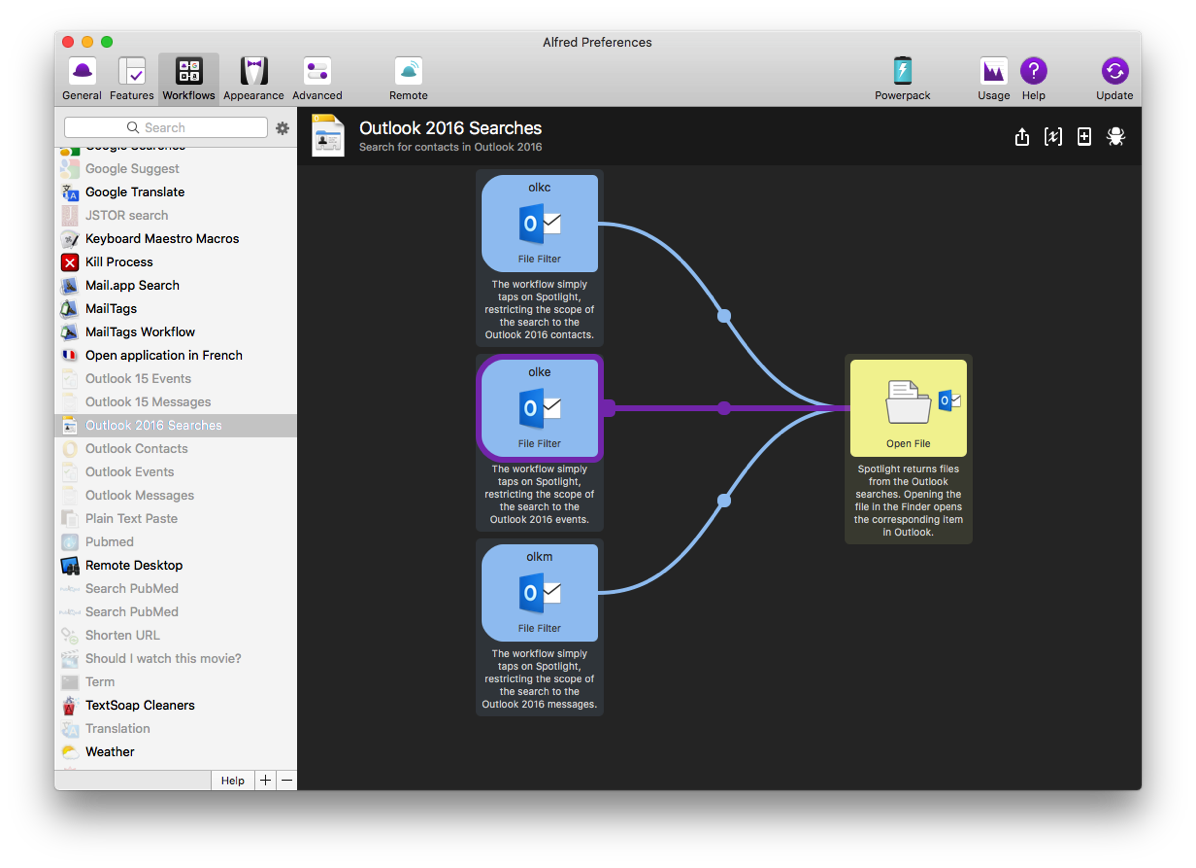
You can use three keywords to trigger the workflow:
- olkm to search messages
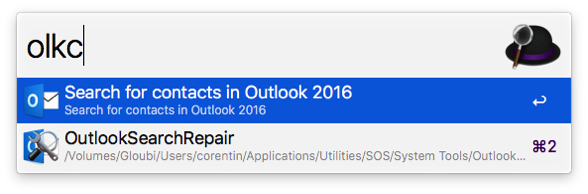
- olkc to search contacts
- olke to search events
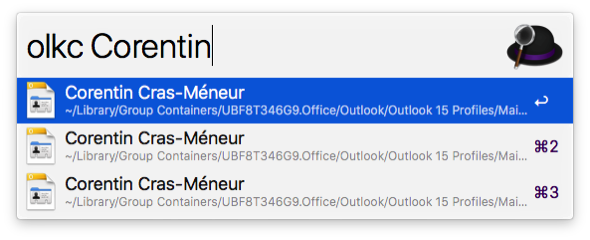
Select the result in Alfred, and it opens in Outlook 2016! It’s that simple.
Reset the preferences in Outlook 2016 for Mac
Sometimes the Preferences in Outlook get corrupted, leading to all sorts of troubles (user interface, messages not sending, app freezing, etc).
The Preferences file hosts a number of settings, but nothing critical per se as the accounts and other related important parameters of the app are saved int he Identity itself instead of the Preference file.
The best way to delete the preferences in Outlook is to quit Outlook, launch the Terminal and use the command:
defaults delete com.microsoft.Outlook; killall csprefsd
The first half of the command clears the preferences while the second half purges the cached parameters.
After that you can relaunch Outlook and check whatever Preferences (Outlook > Preferences) you might want to re-set.
Generate Tagged PDFs (with active links) in Word for Mac 2016 15.23.1+
Starting with Word 15.23, Word can now generate tagged PDFs with properly active links (all sorts of links, including the TOC links and internal links like the ones generated through EndNote).
You need:
- Word 15.23.1 or more recent with an Office 365 subscription
- Make sure that you do NOT have any input method for Right-to-Left languages in the System Keyboard Preferences or a corresponding language in Languages & Region
Use the Save As command and select PDF and you should see an option for “Best for electronic distribution and accessibility”
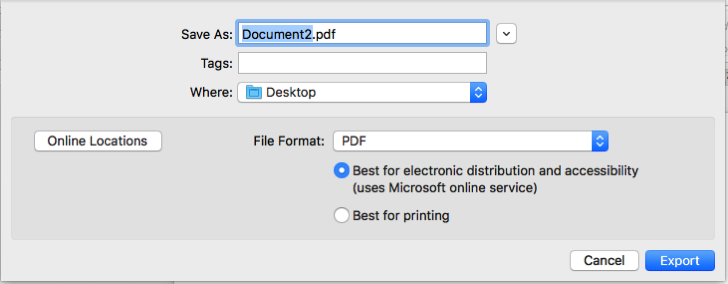
As hinted with he option, the file is sent to a Microsoft Service Server for conversion. The result is a properly tagged PDF with active links!
(Something I’ve been hoping for since the release of Office X and the possibility to export as PDF in Word…)
Spotlight issues in Outlook 2011 (searches and smart folders)
This is basically a repost from my other post about troubleshooting Spotlight issues in Outlook 2016 edited specifically for Outlook 2011.
Outlook 2011 is only 32 bit and you can therefore only use mdworker32. It also stores its files in a different location than Outlook 2016.
Most of the time, you can correct the indexing issue by simply adding the ~/Documents/Microsoft User Data/Office 2011 Identities folder to the Spotlight Exclude list in the Spotlight System Preferences, then a few minutes later, remove it from the list. This will trigger a proper reindexing of the folder.
Sometimes, unfortunately, that’s not enough. That can happen when Spotlight crashes while indexing your Mac, or with weird Spotlight mdimporter conflicts.
You can figure out whether Spotlight crashes by looking for md-related (e.g.: mdworker) crash logs in either /Library/Logs/DiagnosticReports or ~/Library/Logs/DiagnosticReports
For conflicts, etc. you can use the command mdimport -L to list all mdimporters. Sometimes, you’ll see paths for apps that are no longer on your Mac, or apps that are in the trash, etc.
You can also manually reindex the Outlook identity through the terminal using:
mdimport32 -g /Applications/Microsoft\ Office\ 2011/Microsoft\ Outlook.app/Contents/Library/Spotlight/Microsoft\ Outlook.mdimporter ~/Documents/Microsoft\ User\ Data/Office\ 2011\ Identities
Using this command, you have several advantages:
- You only use the mdimporter provided by Outlook so you avoid potential issues with other mdimporters
- You get warnings for any problem that might come up
- When the Terminal goes back to the command prompt, you know it’s done 🙂
Spotlight issues in Outlook 2016
A number of people are frequently reporting searches or filtering issues in Outlook 2016.
Outlook uses Spotlight for the searches and most of these issues are related to Spotlight indexing issues.
Most of the time, you can correct the issue by simply adding the ~/Library/Group Containers/UBF8T346G9.Office/Outlook/Outlook 15 Profiles/Main Profile folder to the Spotlight Exclude list in the Spotlight System Preferences, then a few minutes later, remove it from the list. This will trigger a proper reindexing of the folder.
Sometimes, unfortunately, that’s not enough. That can happen when Spotlight crashes while indexing your Mac, or with weird Spotlight mdimporter conflicts.
You can figure out whether Spotlight crashes by looking for md–related (e.g.: mdworker) crash logs in either /Library/Logs/DiagnosticReports or ~/Library/Logs/DiagnosticReports
For conflicts, etc. you can use the command mdimport -L to list all mdimporters. Sometimes, you’ll see paths for apps that are no longer on your Mac, or apps that are in the trash, etc.
You can also manually reindex the Outlook identity through the terminal using this command:
mdimport ~/Library/Group\ Containers/UBF8T346G9.Office/Outlook/Outlook\ 15\ Profiles/Main\ Profile
This approach offers two advantages compared to using the Spotlight Exclude list mentioned before here:
- When it’s done, you return back to the regular shell prompt. Using the Spotlight exclude list approach gives you no indication of the progress or completion of the task.
- If there is anything wrong, you’ll see a comment in the Terminal. If everything is fine, you simply get back to the prompt. The Spotlight exclude list approach provides no feedback whatsoever if anything goes wrong.
Outlook for Mac 2016 database basic sqlite3 commands
Outlook 2011 had a proprietary database format and we (as users) had very few options to work with it.
Outlook 2016 now uses a sqlite3 databases for its identity (just like Mail).
While there is very little we can run from the app itself in terms of maintenance or troubleshooting, in theory we should be able to tap straight into the database through sqlite3 itself.
********* NONE OF THIS IS PUBLISHED/APPROVED/SUPPORTED BY MICROSOFT FOR OUTLOOK FOR MAC *********
As none of this is officially supported, I would recommend
1) BACKUP the database before anything.
You need to backup the three files:
- Outlook.sqlite
- Outlook.sqlite-shm
- Outlook.sqlite-wal
That are in the ~/Library/Group Containers/UBF8T346G9.Office/Outlook/Outlook 15 Profiles/Main Profile/Data folder.
2) QUIT Outlook. You can’t run anything safely on the identity if it’s still in use in Outlook itself.
• You can check the integrity of the database with the command:
(triple-click the command to select all, then copy)
/usr/bin/sqlite3 ~/Library/Group\ Containers/UBF8T346G9.Office/Outlook/Outlook\ 15\ Profiles/Main\ Profile/Data/Outlook.sqlite "PRAGMA integrity_check"
If everything is fine, the Terminal will return “OK”
If you get a warning there, then obviously something in wrong in the database. In theory, Outlook should detect issues and automatically attempt to fix them, but there are been reports in the forums of identity failures and users no longer able to open up their identities. It might be worth attempting other “rescue” operations in these cases using additional commands like “.dump” etc. (which is beyond the point of this post: search for your favorite sqlite How To or Forum page for additional information on how to repair a corrupted sqlite3 database).
• A number of websites have illustrated how “vacuuming” the envelope index could help speed things up and trim the database in Mail. I figured that the same should apply to Outlook too.
I ran the command in Outlook and the database shrunk a bit. No problem within Outlook whatsoever on my Mac, but who knows… (hence the very very strong suggestion to make a backup).
“Vacuuming” will rebuild the database file, reclaiming free space and defragmenting tables and index. I’m not sure whether Outlook is currently using auto_vacuum or not, but I have read reports of abnormally large Outlook database files which makes me suspect it’s not always taking place as it should if it is even enabled.
You can vacuum the database using:
(triple-click the command to select all, then copy)
/usr/bin/sqlite3 ~/Library/Group\ Containers/UBF8T346G9.Office/Outlook/Outlook\ 15\ Profiles/Main\ Profile/Data/Outlook.sqlite vacuum
On Answers, Michal Palat provides additional options that can allow you to rebuild the sqlite3 database by exporting the data to an ASCII “dump” and recreating a new one based on the output:
https://answers.microsoft.com/en-us/msoffice/forum/msoffice_outlook-mso_mac/outlook-2016-for-mac-outlook-couldnt-repair-the/e486e7b1-6c6e-46e8-9387-36f2442508b9
Deleting the Cities for the weather in Outlook 365 (v15)
Outlook 15 allows you to display the weather in the calendar for various locations.
Unfortunately, even though adding cities to the list there is trivial, deleting the locations is not.
The question was raised in the Answers forums. I asked around and here’s the information I collected:
The list of locations shows the last 5 used locations and cannot be removed manually.
The Outlook preferences file has these locations, and removing the preferences would therefore clear the locations. However removing the preferences file would also reset other settings obviously!The file is here: ~/Library/Containers/com.microsoft.Outlook/Data/Library/Preferences/com.microsoft.outlook.plist but simply trashing it would prevent it from being properly recreated and you will be continually prompted by the add account wizard every time you launch Outlook.
You should quit Outlook and use the
defaults delete com.microsoft.Outlookterminal command to remove preferences. It will delete ALL Outlook preferences (preferences though, not account settings, rules, etc).In order to re-enable the automatically update location option, you need to go to Location Services in System Preferences and grant access to location data to Outlook.
Doing your dissertation with Microsoft Word: A comprehensive guide to using Microsoft Word for academic writing (by Jacques Raubenheimer)
Introduction
Throughout my academic training, I’ve had to write a number of reports and memos of all sorts. As an undergrad during my PhD training, I wrote scientific articles of various complexity, but it’s only really when I had to put together my Thesis defense that I realized that I wouldn’t make it unless I took a serious look at how my workflow could be improved.
A thesis defense in my field is a long and complex manuscript with a detailed introduction section providing a thorough general background on just about everything even vaguely related to what you’ve been studying, then you insert your publications and some sort of analysis of your work and how everything is supposed to fit together to make a “thesis”. It’s long, complex, structured and illustrated. It also needs to integrate previous work from other manuscripts. A nightmare in perspective if you want things to be kept in a somewhat decent shape.
Back then, I already had some general knowledge of what could be achieved in Word, but I didn’t know much beyond the basic formatting options. Fortunately for me, at that time, software like Microsoft Word still came with a printed manual. I had bought the Academic version of Word 6 and had the very nice (and heavy) manual that came with the set of I-can’t-remember-how-many floppies (the rectangular plastic thingies that stored programs in these days…). I read that book from cover to cover (literally) and used my newly acquired knowledge to implement proper style management and image placing in the excruciating task that a thesis defense represents.
General overview
Needless to say that interest was piqued when I was contacted to review Jacques Raubenheimer’s guide. The book promises to help people like me write academic manuscripts using Microsoft Word.
This book is indeed quite extensive: 546 pages covering just about every function and command you can think of in Word, providing a number of captures of the user interface: Big emphasis on the term Comprehensive in the tagline. The book is focused on using Word 2007 or 2010 for Windows, but you’ll be just fine with version 2013 that just came out, or using an equivalent Mac version of Microsoft Office. There are a few user interface differences between the Mac and the Windows version, but I don’t see it as a major throwback as the main aspect of the book, as far as I am concerned, is to learn how to better use the program to the full extend of its capacities to put a long and complex manuscript together. You could even easily adapt the same general knowledge to other related software like Pages or LibreOffice for instance. There is far more in this book than a simple detailed description of the various commands available in Word. It’s more of a guide to structured documents, styles and managing layout, with a hint of typography to make sure it all looks sharp.
The tagline for the book also mentions “a guide for Academic writing”. While it seems to me like it is indeed perfectly adapted for academic writing, I think its scope can easily be broadened to include writing any form of long and complex manuscript, being legal or technical for instance.
More specifically…
While I read the book from cover to cover for the purpose of this review, I’m not sure everybody needs to. Depending on your level of expertise with Microsoft Word, you might want to focus on specific chapters and only browser over the others. It’s also a good source for references if ever you are experiencing difficulties with any specific aspect of how you want to manage your document.
The immersion in the book follows a somewhat progressive slope. The first chapters describe general notions about Word itself and its user interface, then some information about typography and page layout. The following chapters go through inputting text and automating the process, but the real meat starts (as far as I am concerned) with Chapter 5. From then on, the book becomes more technical and covers all important aspects for a complex manuscript: Templates, styles, page layouts, numbering, tables of contents, search and replace, inserting tables and figures (with legends), Math equations, and everything all the way down to printing the manuscript.
Chapter 13 covers inserting and managing citations. It properly describes everything that can be done in Word itself (including Word’s Citation Management tool), but third-party citation managers (EndNote, Reference Manager, Zotero…) are only briefly mentioned. While going into the details of the possibilities of any of these applications could be worth a full book in itself, the use of a software like EndNote in academic writing is so generalized and so crucial that I would have thought it’d be worth a little more attention.
Overall…
I personally enjoyed reading the book. It took me forever — really (I wanted to read it all before I could formulate a proper opinion), but it was well worth it. It would have made my life tremendously easier if the book had been available when I wrote my thesis. A very good and detailed reference guide you can go to at any time if ever you want to improve on your skills with any aspect of what you’ll need to master to write a proper dissertation. It will help save a significant amount of time over the years, whether you’re writing a full thesis, a book or a simple document of a couple of pages or less.
The book is easy to read and well organized. You can jump to any section of the book and find all the details you need to master about the feature of your interest at the moment.
In addition, the author offers a Word (for Windows) add-on that will bring up a new tab in the Ribbon to provide easy access to some very useful functions for document management, styles, bookmarks, reviewing, etc.: Word uTIlities
IMAP available for Outlook.com accounts
Announced today on the Outlook blog:
http://blogs.office.com/b/microsoft-outlook/archive/2013/09/12/outlook-com-now-with-imap.aspx
Hotmail/Live/Outlook has been only accessible through POP for so long that I never ever thought they’d change their mind and offer IMAP…
What’s next? CalDAV and CardDAV for calendar and contacts?
Outlook SP2 fails to upgrade the Outlook Identity
There are a number of posts in the MS forums from users who had significant issues upgrading their Outlook identity for Office 2011.
The upgrade process begins, then you get a message telling you that it failed and you need to repair the identity with a previous version of the Database Utility.
My take on the warning is that the identity had some sort of corruption that the new Database Utility doesn’t know how to fix.
MS posted a Knowledge Base note about the issue with a solution:
http://support.microsoft.com/kb/2702740
Unfortunately, this approach still sometimes fails. There is still an alternate route that has proven more successful:
Either reinstall Office 2011 and update it to at least SP1 (14.1) but NOT SP2 (14.2) or restore Office 14.1.x and use the database utility from this version (/Applications/Microsoft Office 2011/Office/Microsoft Database Utility) to repair your identity.
If it succeeds, you can then relaunch Outlook 14.2 to upgrade, and finally use, your identity for Outlook 14.2.
Before installing the SP2 update for Office 2011…
…I would suggest rebuilding your Outlook identity.
Launch Outlook pressing the option key down to get to the database utility.
Rebuilding the identity will:
- Ensure you are upgrading a somewhat clean identity
- Automatically create a backup of your current identity in ~/Documents/Microsoft User Data/Office 2011 Identities in case something goes bad during the upgrade (there has been numerous reports of corrupted identities that failed to upgrade).
In case you didn’t use these steps and your identity failed to upgrade, MS now has a Knowledge Base article providing instructions on how to get out of this mess:
http://support.microsoft.com/kb/2702740
Office for Mac 14.2 changes the location of Support folders
Office for Mac SP2 just came out. The new update brings a horde of corrections and improvements.
As always, I’m sure people will notice a few new problems here and there, and I just found one such change that prove problematic for some.
In the process of updating your installation of Office to the latest and greatest, the updater moves some folder to a new location. Most files and folders previously in ~/Library/Preferences/Microsoft and in the ~/Documents/Microsoft User Data/ folder are now migrated to ~/Library/Application Support/Microsoft/Office/.
That includes the various Script Menu Items folder, the templates for Word Excel and Powerpoint, and the Preference folder for Office that previously was in ~/Library/Preferences (and that often contained the custom dictionaries).
In a sense, I welcome the move. That’s the recommended location for these items for Mac OS X, but there is one problem:
The folders that are relocated there are re-created, not moved.
This essentially means that AppleScripts placed in the Script Menu Items folders for instance, will no longer show up in the Script menu in their respective applications.
You have to move all your custom scripts, files and templates from the previous default location in ~/Documents/Microsoft User Data/ to the new one in ~/Library/Application Support/Microsoft/Office/.
The ~/Library/ folder being invisible in the Finder in Lion, you might have to use Command-Shift-g in the Finder to trigger the Go To Folder window (where you can enter this path to see the content you need).
You can also use the Script menu in any of the Office applications to select About This Menu… and then click on the Open folder button.
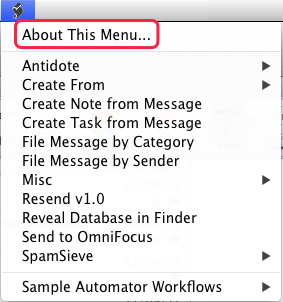
After correcting these little issues, I cleaned-up my MUD to eliminate useless duplications and it now looks like this:
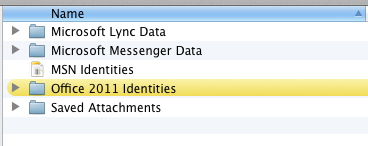
As you can see, user data remains in the MUD folder. I wished they actually had moved these files to a location under ~/Library too, where people are less likely to mess with it, but that’s a different story…
You might also find data folders for various other Microsoft products like Messenger and Lync (or Communicator).
Of note: If you use the Excellent SpamSieve in Outlook, and move the SpamSieve scripts, make sure you edit your Rules to point to the new location.
By default, SpamSieve still installs the scripts in the old location, but the author is usually really responsive and I’m sure future versions will correct that.
New languages for spelling support in Mac OS X 10.7.3
Mac OS X 10.7.3 came out recently. Among the many little things it corrected here and there, it also brought new localizations for Catalan, Croatian, Greek, Hebrew, Romanian, Slovak, Thai, and Ukrainian.
This means that the System now provides proper spelling dictionaries for these languages too!
Since Outlook tape directly into the standard Mac OS X spelling API, it should provide spell checking for these languages as well automatically.
(though Hebrew remains an issue since there is no proper right-to-left support in any of the Office for Mac applications)
[Off Topic] NetNewsWire 4: Send To Papers
You can create a new “Send To Papers“ item in the Share menu in NetNewsWire Lite 4.
All you need is to create a file named SendToApps.plist in ~/Library/Application Support/NetNewsWire Lite with the following text inside:
<?xml version="1.0" encoding="UTF-8"?>

<!DOCTYPE plist PUBLIC "-//Apple//DTD PLIST 1.0//EN" "http://www.apple.com/DTDs/PropertyList-1.0.dtd">

<plist version="1.0">

<dict>

	<key>Papers</key>

	<dict>

		<key>URLTemplate</key>

		<string>papers://url/[[url]]</string>

		<key>BundleID</key>

		<string>com.mekentosj.papers</string>

	</dict>

</dict>

</plist>
If you want, I create one that can be downloaded here:
http://www.cortig.net/temp/SendToApps.plist.zip
Corentin
Antidote HD v5
(This article is about Antidote HD v5, a software that integrates with Office 2011 to provide significantly enhanced French spelling and grammar checking. It‘s useless unless you speak French so this post is in French only)
J’ai posté différents articles ces dernières années sur Antidote de Druide.
Pour résumer les faits, Antidote est un excellent correcteur orthographique et grammatical, qui propose en outre divers dictionnaires de la langue française.
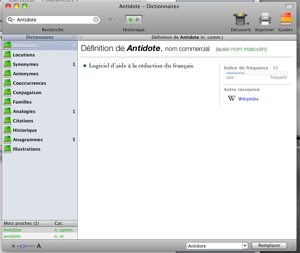
La dernière version (Antidote HD) vient d’être mise à jour en v5 et apporte le support d’Office 2011.
La barre d’outils Antidote apparaît maintenant dans toutes les applications d’Office, y compris Outlook.
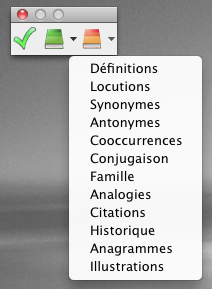
Elle permet un interface entre les deux applications pour lancer la correction de l’orthographe et de la grammaire des documents ouverts dans Office par le biais d’Antidote.
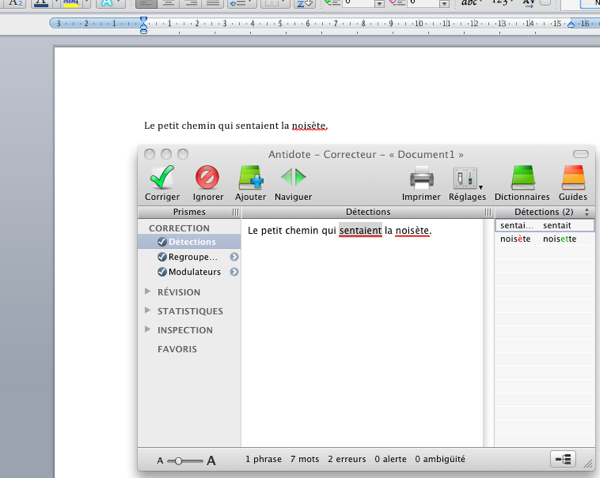
L’intégration est similaire à ce qu’elle était dans les versions précédentes d’Office pour les applications comme Word par exemple, mais le support Anti-Oups est maintenant intégré à Outlook.
Anti-Oups est une technologie (précédemment disponible pour Mail) à deux volets :
– le logiciel détecte automatiquement si vous avez oublié d’intégrer une pièce-jointe à votre e-mail et vous en averti.
– Anti-Oups scanne vos e-mails avant envoi, et si ils sont en français, et que des corrections peuvent être nécessaires, il les bascule vers Antidote pour que vous puissiez utiliser le correcteur orthographique et grammatical.
Extrêmement pratique !!
Une mise à jour fort bienvenue en ce qui me concerne !
Antidote est un logiciel commercial (prix variant selon les pays)
Office 2011
I know I haven’t been posting much on the blog lately. There are several reasons behind it and being completely unable to find any free time to do so might be the main one unfortunately.
I still wanted to mention that Office 2001 for Mac had been released and is also — for the first time — available on MSDN (Premium and Ultimate accounts) and Technet.
Once the dust settles, I’ll try to be more diligent at posting here :-\
Corentin
SyncServices Disk Utility: Spanning Tools for Mac
Disclaimer: I’m not affiliated with the product. I’m just a satisfied user. I just heard about it when it was in public beta, tried it and immediately liked it, but as with anything, your mileage may vary.
Spanning Tools for Mac is a set of utilities that have been created by the authors of Spanning Sync.
The tremendous potentials of Sync Services are obvious to all. Being able to share data between applications, between computers or with additional devices (iPhone anybody??) is wonderful, but for a lot of us, it sometimes turns in a living hell: Data corruption, duplications (endless duplications), loss, syncing stops altogether or a process related to syncing systematically crashes in the background.
Syncing is “less than stellar” for many. While third party applications could be buggy, most now agree that Sync Services have issues and are prone to corruption and we are all desperately waiting for a fix from Apple.
There are several options out there to help you deal with SyncServices issues. I strongly recommend reading the article about SyncServices Troubleshooting on the Entourage Help Website.
The Spanning Sync folks have a lot of experience with Sync Services and quickly identified several sources of corruptions and syncing problems. Then created a set of tools that will analyze your address book and calendar, looking for corruptions or potential sources of troubles and offer you to fix them. This suite offers three applications:
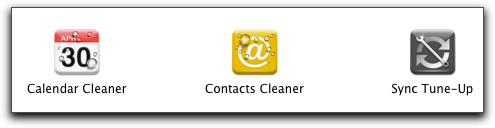
A calendar and contact cleaner, each targeting the corresponding databases on your Mac, and Sync Tune-Up, for more generalized and drastic solutions (more about that later)
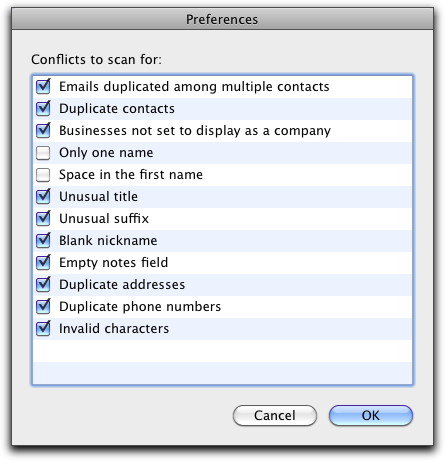
The two “Cleaner” applications follow more or less the same approaches. You can chose what to check in the preferences and then let the applications do their magic.
For instance, if I take the Calendar Cleaner, I have the choice between nine potential sources of problems:
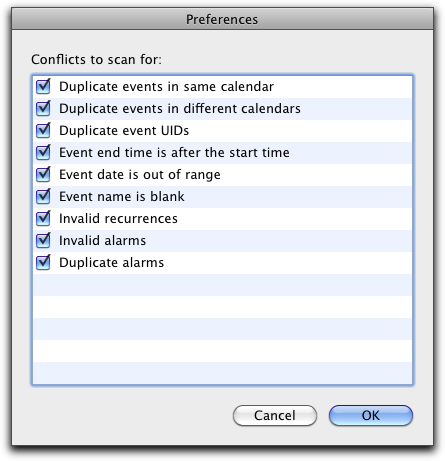
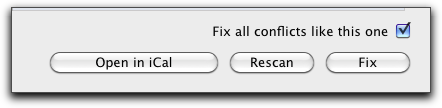
Once the scan is done, the application lists all problematic items, with a detailed description of the problems.
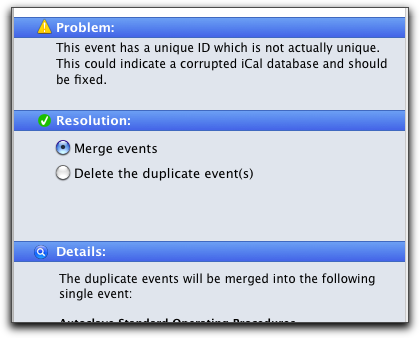
You can then decide how you want it fixed, and let the application do the rest.
The Contact Cleaner is similar and scans for a dozen of possible sources of problems.
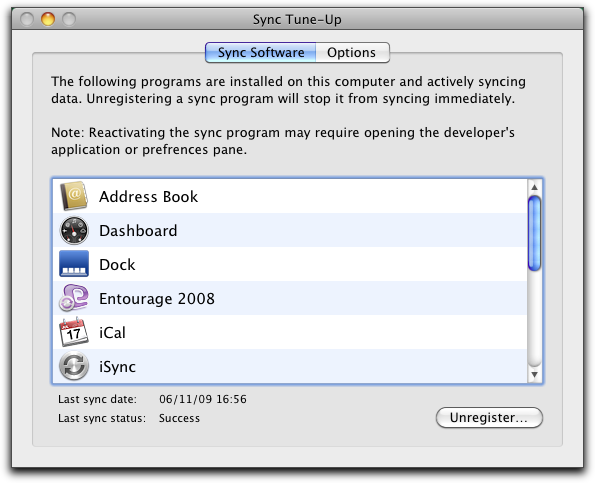
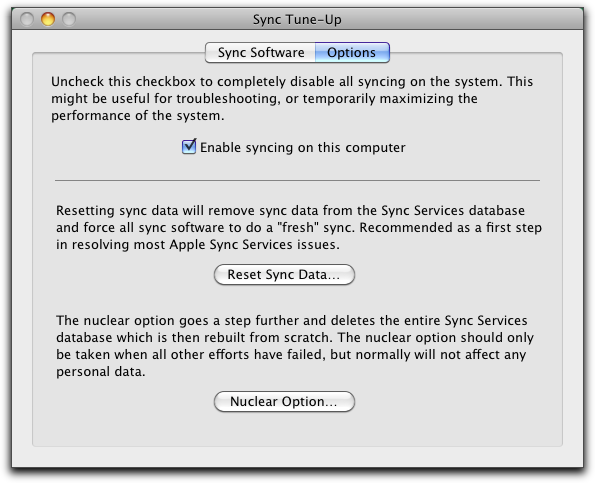
The third application, Sync Tune-Up, takes a more generalized approach. A first panel lets you unregister an application from Sync Services, and a second one offers you to 1) disable SyncServices 2) force a fresh sync and 3) go nuclear and trash all Sync Service data from your Mac to force all applications to repopulate it all from scratch. Not something you should consider lightly, but when you’re desperate…
This set of utilities is shareware: $19.99, with $5 off for Spanning Sync customers.
Some might argue it’s a bit on the pricey side, but it has literally saved my bacon multiple times and corrected nasty issues I was having both with Entourage and MobileMe more than once. For me it was priceless. Continue reading
Archiving your e-mails with EagleFiler (The Entourage Help Blog)
My post on Archiving your e-mails with EagleFiler is out on The Entourage Help Blog 🙂
—
Mon billet sur « Sauvegarder ses e-mails avec EagleFiler » est disponible (en anglais) sur « The Entourage Help Blog » 🙂
PCalc for iPhone
(L’application n’est pas localisée à ma connaissance, aussi je ne poste pas ce billet en français – mais je vais contacter l’auteur pour lui faire la suggestion 😉 )
Now I usually don‘t post here too often about applications that are not in direct relationship with Office, but I thought I could make an exception 😉
I spend a lot of time at work crunching numbers in Excel or other applications (Prism is my friend).
Very often, I just want to run a quick calculation. I used to be a heavy HP48 user, but my calculator dies a while ago and I learnt to live without it.
I recently got an iPod Touch I started looking for a decent scientific calculator that would also support the RPN notation.
Well the search is over, I found it!
I first tried the lite version (free) then quickly migrated to the full, paid version of PCalc.
PCalc is developped by TLA Systems (they also make the famous DragThing) offers all the functions I’ve been looking for (and was updated today with even more goodness)
- Scientific calculator
- RPN mode with two lines of text (I’d love to be able to squeeze even more, bt I understand that it might not be really practical on the iPhone/iPod Touch screen).
Conversions, tons of conversions - paper-tape mode (do all your calculations and have the app summarize the all thing as if you had been using a paper-tape printing calculator – very useful to summarize a long set or inter-related calculations)
- Themes (I like themes)
- octal, hexadecimal, etc calculations (I don’t use this, but many people do)
- etc…
If you are like me and think that the built-in calculator is far too limited for your taste and are on the market for something like that, I encourage you to try the lite version first. Be careful, you might get hooked like me and get the full one ($9.99 — but well-worth it in my opinion).
In addition, the author seems extremely active, responds quickly to suggestions (and Tweets)
Now there is also a regular MacOS X version, but I can’t comment on it since I haven’t tried it (I use the iPod Touch all the times for these quick calculations)